Project management with SharePoint helps companies consolidate scattered project information in Microsoft 365 and steer project work more clearly. After all, project work rarely fails due to a lack of information. Often the problem lies elsewhere: tasks are in emails, decisions are made in meetings, project statuses end up in Excel files, and follow-up questions are distributed across multiple channels. The team works, but the overview is created late or only with additional coordination effort.
Instead of introducing another heavy specialized tool, the solution uses the existing Microsoft 365 environment: SharePoint as a shared data foundation, Power Apps as a simple interface for daily use, and Power Automate for notifications, status changes, and recurring processes.
The goal is not an overloaded enterprise system, but a pragmatic start: projects become more visible, work packages can be steered in a traceable way, and leaders receive better decision-making foundations without burdening teams with unnecessary tool complexity.
Project management with SharePoint: what you gain
With a lean solution consisting of SharePoint, Microsoft Lists, Power Apps, and Power Automate, companies gain primarily overview, accountability, and practicality.
- Less tool sprawl: Project information no longer lies scattered in emails, Excel files, and individual notes.
- More transparency: Responsibilities, status, open points, and effort become clearly visible.
- Better collaboration: Teams work on a common basis, instead of gathering information retrospectively.
- Faster start: The solution uses Microsoft 365 and can start as an MVP with a clearly limited scope.
- Targeted expansion: When the core process works, reporting, automation, or Teams integration can be added step by step.
If you already work with SharePoint, Teams, or Microsoft Lists, the start is particularly natural. Many foundations are already present organizationally and in terms of licenses. Then the decisive factor is not the maximum feature list, but a clean process that is actually used.
Why project work often becomes unclear
In many organizations, projects do not arise in a central system, but from daily life: an internal initiative, a customer project, a process improvement, a digitalization order. At the beginning, a list or a short status report is often enough. Over time, however, the number of involved parties, tasks, and decisions grows.
Without a common structure, typical friction points arise:
- Status information is not current or hard to find.
- Responsibilities are clarified in meetings but not tracked clearly.
- Effort and progress are only visible to leaders through follow-up questions.
- Teams maintain multiple folders, lists, or files in parallel.
- Project managers spend too much time on coordination instead of steering.
A lean approach for project management with SharePoint helps to organize these points. It does not replace good project leadership, but makes it significantly easier because all parties look at the same status.
Project management with SharePoint as a common project hub
The target design is a central project hub that combines portfolio overview and operational work. On one side are projects, priorities, status, and responsibilities. On the other side are concrete work packages, open tasks, feedback, and effort.
Important here is the balance. A good system must not remain so coarse that it is only a project list. It must not become so complex that teams spend more time on maintenance than on implementation. That is exactly why an MVP approach is suitable: first map the most important control information, then learn with real projects and expand specifically.
For many companies, a clear structure for the following is sufficient at the start:
- active projects and their status,
- larger work packages or topic areas,
- operational tasks and open items,
- responsibilities and deadlines,
- simple evaluations of progress and effort.
This creates a reliable framework without immediately needing to introduce methodological logic, extensive resource planning, or complex portfolio management.
The building blocks of the solution on Microsoft 365
SharePoint as the central data foundation
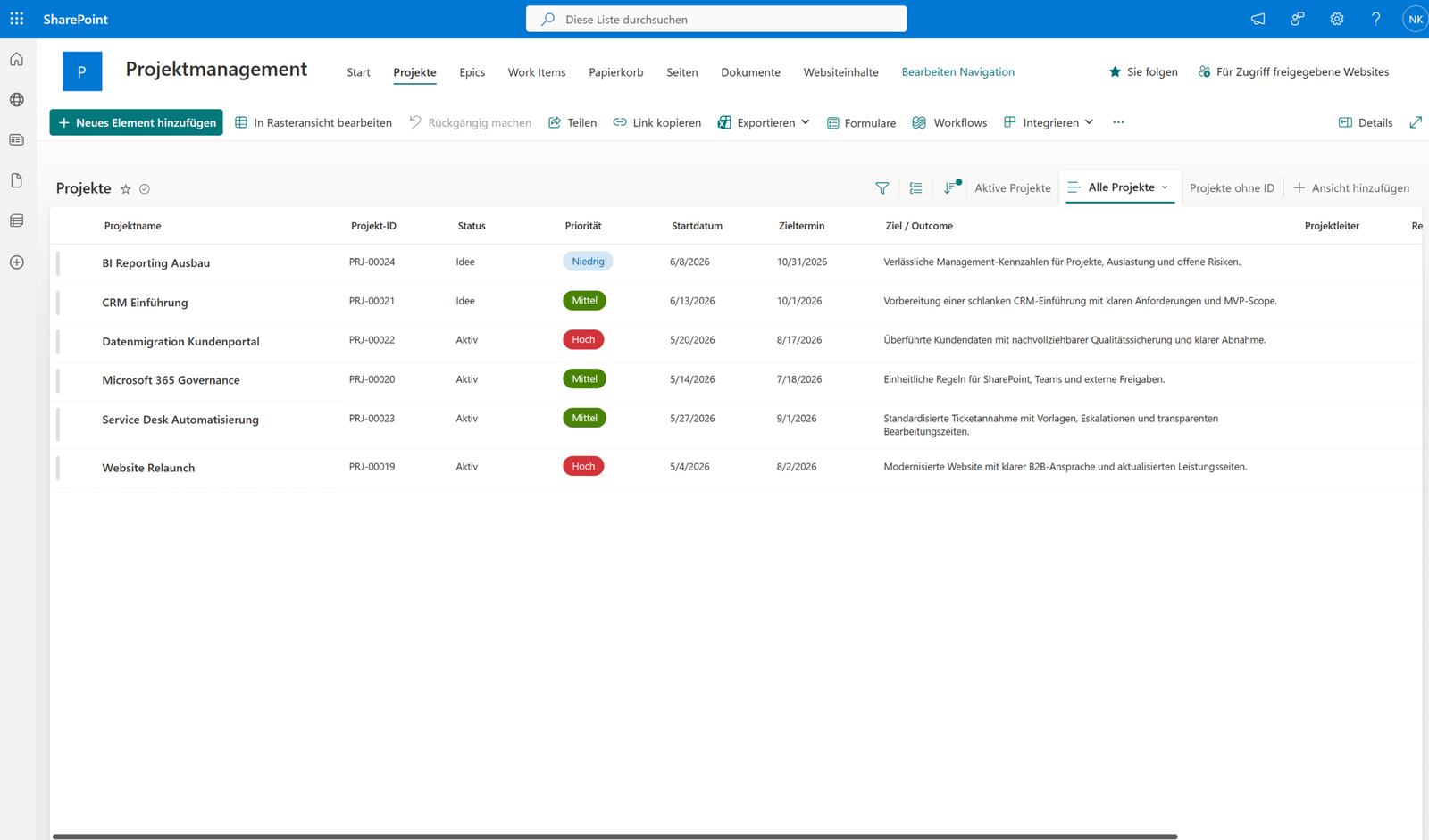
SharePoint and Microsoft Lists structure the most important project information. As a result, data does not remain hidden in a single app but can also be managed through list views, filters, permissions, and search functions. This is helpful in operations because administration, support, and evaluation stay close to Microsoft 365.
For companies that want to additionally store project documents cleanly, project management with SharePoint fits well with the central project storage in SharePoint. Project control and document storage do not need to be thought of separately but can complement each other meaningfully.
Power Apps as a simple interface
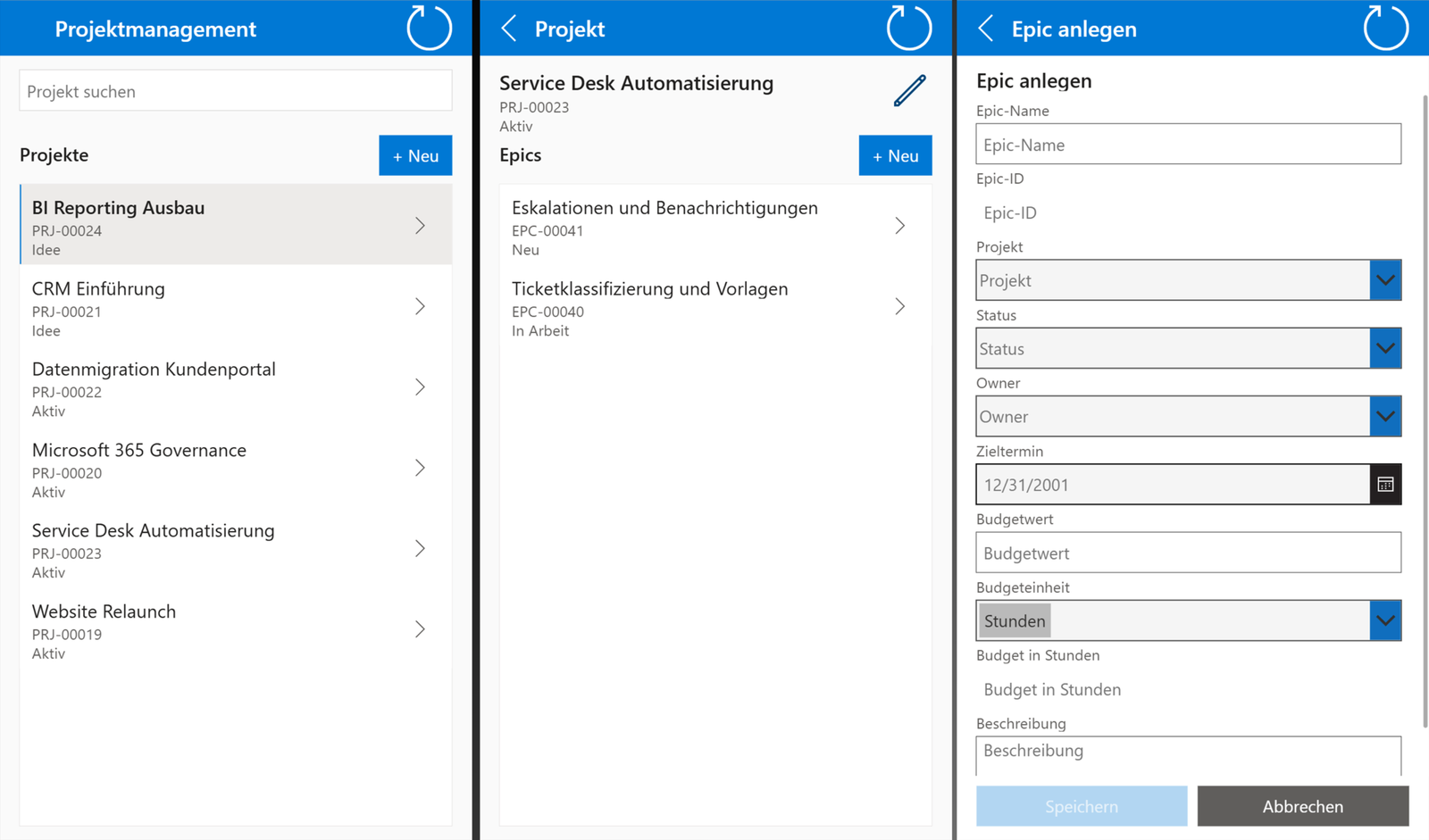
Power Apps provides the operational interface for project owners and teams. Instead of clicking through multiple lists, users see a focused view: relevant projects, open work packages, next steps, and the information that is really needed for daily work.
Acceptance is decided right here. A solution is only maintained if it is faster than the old way via email, Excel, and follow-up questions. Therefore, the interface should remain intentionally reduced and clearly guide the most important actions.
Power Automate for recurring processes
Power Automate takes over routine tasks that otherwise easily get left behind: notifications for status changes, reminders for open items, regular summaries, or simple approval workflows. This keeps project work up to date without having to manually track every detail.
If you already structure processes with Microsoft 365, it is also worth looking at workflows and data based on SharePoint and Power Platform. There, the connection between data foundation, automation, and process management is assessed more broadly. For operational project tasks, connecting SharePoint tasks with Power Automate describes how status changes and follow-up tasks are triggered in a controlled manner.
From excel lists to reliable control
Excel is often practical for the start. It becomes problematic when project lists permanently become the central control mechanism. Then versions, manual updates, unclear responsibilities, and status reports emerge that require a lot of work but quickly become outdated.
Project management with SharePoint creates more reliability here. Project information is maintained where it is created. Status, responsibilities, and open items are understandable for authorized persons. Managers can more quickly recognize which initiatives are going well and where support is needed.
The advantage lies not only in the technology. The real gain arises through a shared work picture: all involved parties know which information is maintained, where it can be found, and which next steps follow from it.
Metrics for project management with SharePoint
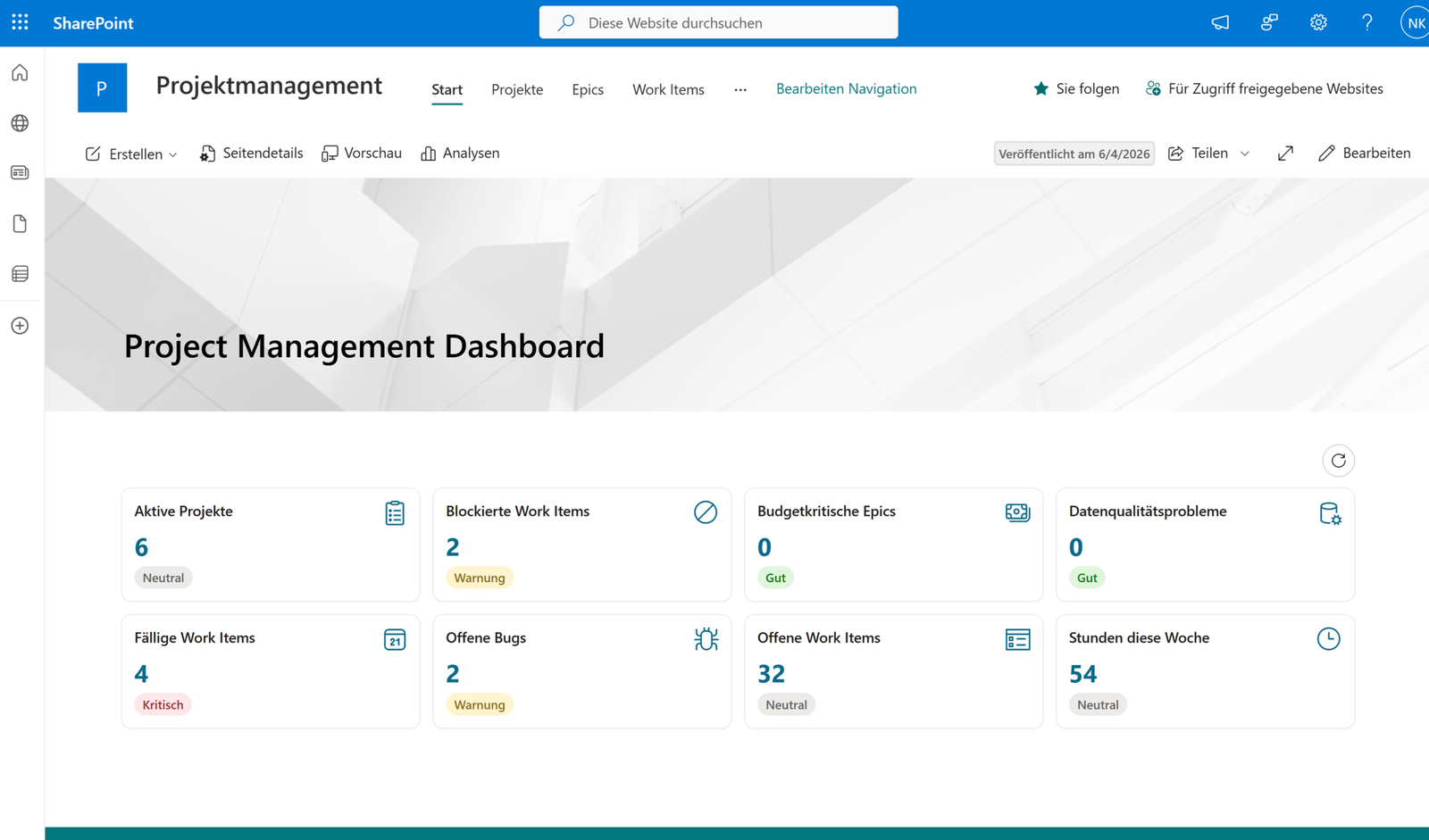
A project management MVP does not need to deliver extensive reporting immediately. Often, a few metrics are sufficient to facilitate better conversations:
- How many projects are active?
- Which work packages are overdue or blocked?
- Where do delays occur repeatedly?
- Which projects require immediate attention?
- How does the effort evolve over several weeks?
These metrics should remain close to operational data. A simple dashboard in SharePoint, Power Apps, or later Power BI can suffice to make priorities visible. It is important that the metrics are not maintained artificially but emerge from the ongoing work process.
What should deliberately remain lean
Especially in project management, there is a strong temptation to depict too much immediately: sprints, capacity planning, budget logic, individual permissions, approval levels, dependencies, Teams notifications, Power BI reports, and special cases for every project type.
A good MVP starts differently. It focuses on the core process:
Make projects visible. Structure work. Clarify responsibilities. Maintain progress. Enable steering.
Everything else should be added only when the benefit is clear. This keeps the introduction manageable, and teams experience the solution not as additional bureaucracy but as relief.
Typical objections and clear answers
"Do we not need a proper project management tool for this?"
Not necessarily. Specialized tools are sensible when complex portfolio planning, resource management, or agile frameworks are needed on a large scale. For many internal projects, digitalization initiatives, or business team endeavors, project management with SharePoint is, however, the more pragmatic start.
"Will this not be too technical for teams?"
The technical basis lies in SharePoint, Power Apps, and Power Automate. In daily life, teams see primarily an understandable interface and clear processes. The decisive factor is that the solution is thought of in terms of business requirements: Which information is truly helpful? Which steps should become simpler? Which views does daily business need?
"How do we prevent a new shadow solution?"
Through clear governance. The solution should be built with defined roles, traceable permissions, documented processes, and a common data basis. Then, no private silo solution is created, but a controlled process within Microsoft 365.
"Can we extend this later?"
Yes. That is precisely the advantage of a lean start. When the core process runs stably, notifications, dashboards, sharing, Teams integration, or Power BI analyses can be added specifically. Extension then follows actual need and not a theoretical wish list.
Start project management with SharePoint: 3 steps
- Clarify the process map and scope of goals
Which project types should be represented? Which roles maintain information? Which control questions must be answered regularly? - Build an MVP in Microsoft 365
SharePoint lists, Power Apps interface, and automations are aligned to the core process. The scope remains intentionally small enough to test quickly with real projects. - Pilot and expand deliberately
After the pilot, review which views, notifications, or reports actually deliver value in daily work. Then expand, not overload beforehand.
If individual workflows are already being digitized, this start can be well combined with broader process optimization with Power Automate and SharePoint.
Project management with SharePoint that is supported in daily work
Project management with SharePoint is not a substitute for clear leadership, good communication, or sensible priorities. However, it creates a reliable foundation so these things succeed more easily: less scattered information, less manual status work, and more transparency about ongoing initiatives.
The project hub becomes viable when the process map, Microsoft 365 architecture, interface, and MVP scope are considered together, and future expansions are deliberately evaluated separately.
This might also interest you
- Automate workflows & data with SharePoint and Power Platform
- Optimize business processes with Power Automate & SharePoint
- Central project repository in SharePoint instead of paper plans
Plan the project hub robustly
If project work is to be consolidated in Microsoft 365, a technical review of the data model, roles, views, and MVP scope helps. Discuss the technical use case